1. Open Outlook Express or mail program you plan on using for your email. Most programs are set up pretty much the same way.
(This is a basic generalization and may not be worded exactly the same)
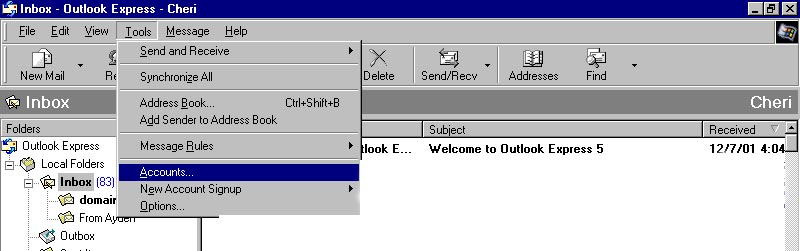
2. Then Click on Tools, scroll down and click on accounts (see diagram below)
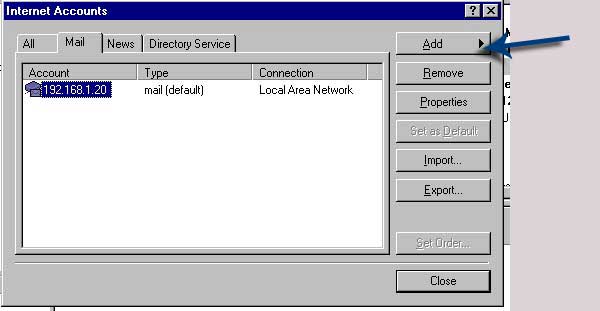
3. Click on mail tab and then click on add>mail (see diagram below)
4. Follow the prompts from the wizard.
Display-name- Enter your name or your company name ( This is what people see as the from when they receive your email)
Email address: this is the address that you have been assigned.
5. -enter information the same as diagram below.
for outgoing mail, you have to get your settings from your current Internet Service Provider or if you are already sending mail copy the same setting as that email account. You may also have to register your new email address with your ISP to allow you to send through their server using your new email address.
Note: Rogers requires this, please read - verify-email
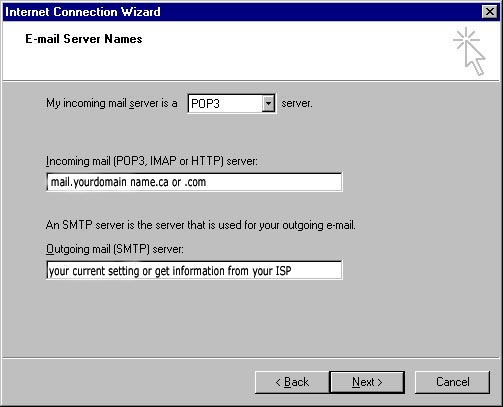
Click next
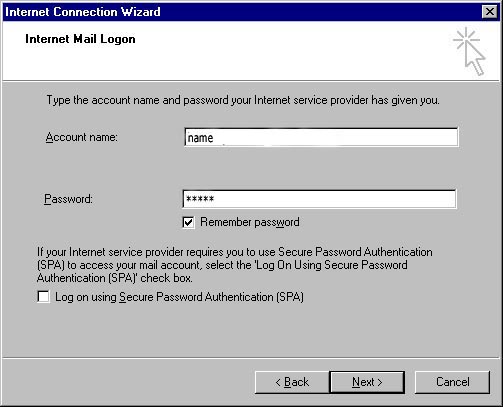
Fill in account information account name or user name
that was supplied to you
password:
remember to keep unchecked the "logon using Secure password authentication"
see diagram below:
Click next and finish and everything should be set up. We initially send a test email with your settings to test your email account so you'll know whether everything is set-up correctly. As a courtesy you could reply to this.
Thank you and please call with any problems you may have.
519-268-2559 or your Sales Person
Designed and Hosted by Internet Advertising Corp.